


ลิงค์ด่วน
ติดต่อด่วน
ที่อยู่
ชั้น 6 อาคารฮูกวนตอง ชวนเจ่3020ถนนล็อกกัง อําเภอล็อกกัง เขตล็อกกัง เชียงใหม่
โทร
86-0755-28795817
จดหมายข่าวของเรา
สมัครรับจดหมายข่าวของเราเพื่อรับส่วนลดและอื่นๆ อีกมากมาย

Many people who buy projectors or conduct projection projects make the biggest mistake by choosing the wrong lumen rating.
Especially when creating multi-screen blending or immersive spaces, mismatched brightness or improper blending adjustments can still result in washed-out images and a grayish appearance, directly lowering the overall presentation quality. Today, we'll use a concise guide to help you understand the essence of lumens, from home viewing to immersive engineering scenarios, teaching you how to choose the right model step-by-step, and explaining the core pairing techniques for multi-channel projectors.
01 Simple Explanation: What exactly are lumens?
Lumens (lm) = the projector's screen brightness capability. Simply put, it's the machine's ability to "resist ambient light and produce a clear image." The higher the value, the stronger the light, the better it resists ambient light, and the less likely it is to produce a blurry image on a large screen. However, when choosing a projector, it's crucial to adhere to the standards and avoid marketing gimmicks:
✅ Look for ANSI/CVIA lumens: This represents true, effective screen brightness, a reliable standard applicable to both home and professional projects.
❌ Don't trust light source lumens: These are often misrepresented parameters with highly inflated numbers and minimal reference value.
Recognize the core selection logic: Lumen selection is never solely based on the scene; the core considerations are ambient brightness and projection size. Larger screens have lower illuminance per unit area, making the image more prone to appearing grayish; stronger ambient light requires a larger effective lumen margin. Discussing lumens without considering screen size is meaningless. Here's a key engineering concept: illuminance (lm/㎡, lux), commonly known in the industry as lumens per unit area, is the core selection standard for professional projection projects.
02 Basic Science: Total Lumens & Lumens per Unit (Illuminance) Conversion
1. Total Lumens (LM): The total light emitted by the projector, a nominal parameter of the device.
2. Lumens per Unit (lux, lm/㎡): The effective brightness projected onto the screen, a true value that directly determines the perceived brightness to the human eye. Simplified engineering conversion formula: Screen Illuminance (lux/lm/㎡) = Effective Lumens of Projector ÷ Projected Screen Area (㎡)
Supplementary 16:9 Standard Screen General Size Conversion: 100 inch ≈ 5.5㎡, 120 inch ≈ 7.1㎡, 150 inch ≈ 11.1㎡, 200 inch ≈ 19.7㎡, allowing for quick and accurate calculation of unit brightness. In short: Total lumens are a device parameter, while unit illuminance is the actual perceived brightness of the image.
Plain Understanding: With the same total lumens, the larger the projected image and the wider the area, the less light is distributed per square meter of screen, resulting in lower unit brightness and a darker, blurrier image. For home use, brightness uniformity requirements are lower, and total lumens can be used as a rough reference. However, for commercial showrooms, immersive projects, and multi-projector integration, unit illuminance must be the sole core selection criterion.
Appendix: General Illuminance Standard Thresholds in the Projector Industry (Official Basis for On-the-Spot Selection)
03 Home Projector Selection: Precise Matching Based on Size and Ambient Light
Core of Home Projector Selection: Matching brightness to a fixed screen size, avoiding blindly piling on high lumens, and balancing viewing comfort and image quality:
🌙 Completely Dark Home Environment (No Natural Light, Lights Off)
80–100 inch Screen: 800–1500 lumens, clear image quality, pure blacks.
☀️ Low-Light Living Room (Blackout Curtains)
100–120 inch Screen: Starting from 1800–2800 lumens, clear image without whitening, suitable for day and night viewing, compatible with mainstream large-screen home use.
💡 Bright Living Room (Floor-to-ceiling Windows, No Blackout Curtains)
100–120 inch Screen: Laser models with 3500 lumens or more; for ultra-large screens of 120 inches or more, 4500 lumens is recommended, sufficient brightness margin to counteract ambient light, clear image without blurring.
04 Commercial/Small-Scale Projection Scenarios: Conference Room and Exhibition Hall Selection
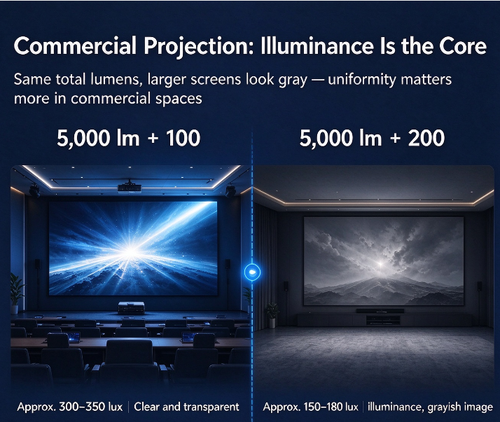
Many people choose commercial projectors based solely on total lumens, a typical industry misconception! The core selection criterion for commercial and small-scale projection projects is brightness per unit area. The same 5000 lumens projected onto a 100-inch screen will be clear and transparent, while projecting it onto a 200-inch screen will result in a severely grayish appearance; the fundamental difference lies in insufficient illuminance per unit area. Commercial scenarios have extremely high requirements for image uniformity and visual consistency. For single-screen and dual-screen projections, the brightness margin per unit area must be calculated in conjunction with the screen size and continuously operating lighting.
For essential commercial splicing scenarios: When splicing images from two or more projectors, overlapping areas can cause light superposition, naturally forming noticeable bright bands, resulting in a fragmented and cluttered image. Precise edge brightness gradients and color balance calibration are required here. For scenarios such as multi-channel projector splicing and blending, the Fanxiu Blender is an efficient and practical solution. No complex professional debugging is required. It can quickly achieve precise geometric correction, blend with brightness gradients, and unify RGB color across the entire spectrum, completely eliminating bright bands in the splicing. This allows for seamless integration of multiple projected images with uniform brightness, perfectly meeting the needs of long-term, routine commercial displays.
05 Large-Scale Projects/Immersive Projections: Exhibition Halls, Cultural Tourism, CAVE Spaces
In the field of immersive projects, total lumens are meaningless; unit illuminance is the only core factor for selection. Circular screens, dome screens, CAVE spaces, and ultra-large splicing screens in cultural tourism all utilize multi-projector splicing. Even if the total lumen output of a single projector is extremely high, if the unit brightness of a single image is insufficient or uneven, the overall image will be dark, mottled, and lacking in detail.
Key Considerations for Engineering Projects: Minor brightness deviations in machine parameters and edge processing of blending bands cannot be corrected by the projector's built-in calibration functions. Professional blending equipment is essential for comprehensive, fine-tuned calibration.
Unifying the unit brightness across the entire screen and eliminating color and brightness differences caused by blending band overlaps are crucial for an immersive large-screen experience. The Fanxiu hardware blender utilizes a pure hardware architecture, supporting stable 24/7 operation and adapting to all engineering scenarios, including curved screens, irregularly shaped screens, CAVE spaces, and ultra-large panoramic screens. It can precisely adjust the unit brightness data of each image, independently calibrating the Gamma curve and RGB color of each image, accurately smoothing out brightness differences in the blending band, significantly reducing on-site debugging and rework costs, and achieving uniform brightness, consistent color, and natural transitions across the entire screen.
[Image]
06 Core Summary
For commercial and engineering projectors, always check the unit illuminance (lm/㎡) to completely avoid being misled by falsely advertised lumens. High-quality projection parameters determine the upper limit of the image quality, and professional blending calibration is the core key to a high-quality immersive large-screen experience.
For customized solutions including curved screens, immersive exhibition halls, and multi-channel projection blending, please feel free to contact us.

